Using the Tesseract OCR engine in R
2025-03-23
The tesseract package provides R bindingsTesseract: apowerful optical character recognition (OCR) engine that supports over100 languages. The engine is highly configurable in order to tune thedetection algorithms and obtain the best possible results.
Keep in mind that OCR (pattern recognition in general) is a verydifficult problem for computers. Results will rarely be perfect and theaccuracy rapidly decreases with the quality of the input image. But ifyou can get your input images to reasonable quality, Tesseract can oftenhelp to extract most of the text from the image.
Extract Text from Images
OCR is the process of finding and recognizing text inside images, forexample from a screenshot, scanned paper. The image below has someexample text:
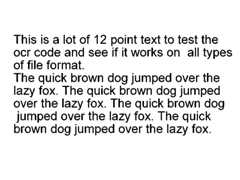
library(tesseract)eng <- tesseract("eng")text <- tesseract::ocr("http://jeroen.github.io/images/testocr.png", engine = eng)cat(text)## This is a lot of 12 point text to test the## ocr code and see if it works on all types## of file format.## ## The quick brown dog jumped over the## lazy fox. The quick brown dog jumped## over the lazy fox. The quick brown dog## jumped over the lazy fox. The quick## brown dog jumped over the lazy fox.Not bad! Theocr_data() function returns all words inthe image along with a bounding box and confidence rate.
results <- tesseract::ocr_data("http://jeroen.github.io/images/testocr.png", engine = eng)results## # A tibble: 60 × 3## word confidence bbox ## <chr> <dbl> <chr> ## 1 This 96.8 36,92,96,116 ## 2 is 96.9 109,92,129,116## 3 a 95.7 141,98,156,116## 4 lot 95.7 169,92,201,116## 5 of 96.5 212,92,240,116## 6 12 96.5 251,92,282,116## 7 point 96.4 296,92,364,122## 8 text 96.2 374,93,427,116## 9 to 96.9 437,93,463,116## 10 test 97.0 474,93,526,116## # ℹ 50 more rowsLanguage Data
The tesseract OCR engine uses language-specific training data in therecognize words. The OCR algorithms bias towards words and sentencesthat frequently appear together in a given language, just like the humanbrain does. Therefore the most accurate results will be obtained whenusing training data in the correct language.
Usetesseract_info() to list the languages that youcurrently have installed.
tesseract_info()## $datapath## [1] "/Users/jeroen/Library/Application Support/tesseract5/tessdata/"## ## $available## [1] "eng" "nld" "osd" "snum"## ## $version## [1] "5.5.0"## ## $configs## [1] "alto" "ambigs.train" "api_config" "bigram" ## [5] "box.train" "box.train.stderr" "digits" "get.images" ## [9] "hocr" "inter" "kannada" "linebox" ## [13] "logfile" "lstm.train" "lstmbox" "lstmdebug" ## [17] "makebox" "pdf" "quiet" "rebox" ## [21] "strokewidth" "tsv" "txt" "unlv" ## [25] "wordstrbox"By default the R package only includes English training data. Windowsand Mac users can install additional training data usingtesseract_download(). Let’s OCR a screenshot from Wikipediain Dutch (Nederlands)
# Only need to do download once:tesseract_download("nld")# Now load the dictionary(dutch <- tesseract("nld"))## <tesseract engine>## loaded: nld ## datapath: /Users/jeroen/Library/Application Support/tesseract5/tessdata/ ## available: eng nld osd snumtext <- ocr("https://jeroen.github.io/images/utrecht2.png", engine = dutch)cat(text)## Geschiedenis van de stad Utrecht## ## In de geschiedenis van de stad Utrecht vond reeds in de prehistorie## kleinschalige bewoning plaats. De Romeinen bouwden rond 50 n.Chr. in het## kader van een zeer omvangrijk militair bouwproject langs de toenmalige## Rijnloop in Utrecht het fort Traiectum ter hoogte van het Domplein. Hierdoor## werd de grondslag voor de stad gelegd. Na het vertrek van de Romeinen## rond 270, vestigden in het midden van de 5e eeuw Franken zich in de regio.## Vanaf de 7e eeuw tot het begin van de 8e eeuw zou dat tot conflicten met## Friezen leiden.## ## Rond het jaar 700 arriveerden Angelsaksische missionarissen om het## gebied te kerstenen en vestigden in het oude Romeinse fort daarvoor hun## basis onder Frankische bescherming. Het groeide uit tot de burcht Trecht en## het kerkelijk centrum. Hiernaast ontstond in de 10e eeuw met Stathe een## bloeiend handelscentrum met koop- en ambachtslieden.## ## In 1122 verkreeg Utrecht stadsrechten en kort daarop werden stadswallen## met een verdedigingsgracht om de stad aangelegd. Door verdere groei was## Utrecht tot halverwege de 16e eeuw de grootste stad van de Noordelijke## Nederlanden.As you can see immediately: almost perfect! (OK just take myword).
Preprocessing with Magick
The accuracy of the OCR process depends on the quality of the inputimage. You can often improve results by properly scaling the image,removing noise and artifacts or cropping the area where the text exists.Seetesseractwiki: improve quality for important tips to improve the quality ofyour input image.
The awesomemagickR package has many useful functions that can be use for enhancing thequality of the image. Some things to try:
- If your image is skewed, use
image_deskew()andimage_rotate()make the text horizontal. image_trim()crops out whitespace in the margins.Increase thefuzzparameter to make it work for noisywhitespace.- Use
image_convert()to turn the image into greyscale,which can reduce artifacts and enhance actual text. - If your image is very large or small resizing with
image_resize()can help tesseract determine text size. - Use
image_modulate()orimage_contrast()orimage_contrast()to tweak brightness / contrast if thisis an issue. - Try
image_reducenoise()for automated noise removal.Your mileage may vary. - With
image_quantize()you can reduce the number ofcolors in the image. This can sometimes help with increasing contrastand reducing artifacts. - True imaging ninjas can use
image_convolve()to usecustomconvolutionmethods.
Below is an example OCR scan. The code converts it to black-and-whiteand resizes + crops the image before feeding it to tesseract to get moreaccurate OCR results.
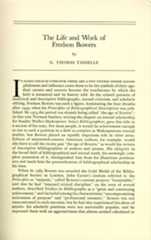
library(magick)## Linking to ImageMagick 6.9.12.93## Enabled features: cairo, fontconfig, freetype, heic, lcms, pango, raw, rsvg, webp## Disabled features: fftw, ghostscript, x11input <- image_read("https://jeroen.github.io/images/bowers.jpg")text <- input %>% image_resize("2000x") %>% image_convert(type = 'Grayscale') %>% image_trim(fuzz = 40) %>% image_write(format = 'png', density = '300x300') %>% tesseract::ocr() cat(text)## The Life and Work of## Fredson Bowers## by## G. THOMAS TANSELLE## ## N EVERY FIELD OF ENDEAVOR THERE ARE A FEW FIGURES WHOSE ACCOM-## plishment and influence cause them to be the symbols of their age;## their careers and oeuvres become the touchstones by which the## field is measured and its history told. In the related pursuits of## analytical and descriptive bibliography, textual criticism, and scholarly## editing, Fredson Bowers was such a figure, dominating the four decades## after 1949, when his Principles of Bibliographical Description was pub-## lished. By 1973 the period was already being called “the age of Bowers”:## in that year Norman Sanders, writing the chapter on textual scholarship## for Stanley Wells's Shakespeare: Select Bibliographies, gave this title to## a section of his essay. For most people, it would be achievement enough## to rise to such a position in a field as complex as Shakespearean textual## studies; but Bowers played an equally important role in other areas.## Editors of nineteenth-century American authors, for example, would## also have to call the recent past “the age of Bowers,” as would the writers## of descriptive bibliographies of authors and presses. His ubiquity in## the broad field of bibliographical and textual study, his seemingly com-## plete possession of it, distinguished him from his illustrious predeces-## sors and made him the personification of bibliographical scholarship in## ## his time.## ## When in 1969 Bowers was awarded the Gold Medal of the Biblio-## graphical Society in London, John Carter’s citation referred to the## Principles as “majestic,” called Bowers’s current projects “formidable,”## said that he had “imposed critical discipline” on the texts of several## authors, described Studies in Bibliography as a “great and continuing## achievement,” and included among his characteristics “uncompromising## seriousness of purpose” and “professional intensity.” Bowers was not## unaccustomed to such encomia, but he had also experienced his share of## attacks: his scholarly positions were not universally popular, and he## expressed them with an aggressiveness that almost seemed calculated toRead from PDF files
If your images are stored in PDF files they first need to beconverted to a proper image format. We can do this in R using thepdf_convert function from the pdftools package. Use a highDPI to keep quality of the image.
pngfile <- pdftools::pdf_convert('https://jeroen.github.io/images/ocrscan.pdf', dpi = 600)## Converting page 1 to ocrscan_1.png... done!text <- tesseract::ocr(pngfile)cat(text)## | SAPORS LANE - BOOLE - DORSET - BH25 8 ER## TELEPHONE BOOLE (94513) 51617 - TELEX 123456## ## Our Ref. 350/PJC/EAC 18th January, 1972.## Dr. P.N. Cundall,## Mining Surveys Ltd.,## Holroyd Road,## Reading,## Berks.## Dear Pete,## ## Permit me to introduce you to the facility of facsimile## transmission.## ## In facsimile a photocell is caused to perform a raster scan over## ## the subject copy. The variations of print density on the document## cause the photocell to generate an analogous electrical video signal.## This signal is used to modulate a carrier, which is transmitted to a## remote destination over a radio or cable communications link.## ## At the remote terminal, demodulation reconstructs the video## signal, which is used to modulate the density of print produced by a## printing device. This device is scanning in a raster scan synchronised## with that at the transmitting terminal. As a result, a facsimile## copy of the subject document is produced.## ## Probably you have uses for this facility in your organisation.## ## Yours sincerely,## P.J. CROSS## Group Leader - Facsimile Research## Registered in England: No. 2038## No. 1 Registered Office: GO Vicara Lane, Ilford. Essex.Tesseract Control Parameters
Tesseract supports hundreds of “control parameters” which alter theOCR engine. Usetesseract_params() to list all parameterswith their default value and a brief description. It also has a handyfilter argument to quickly find parameters that match aparticular string.
# List all parameters with *colour* in name or descriptiontesseract_params('colour')## # A tibble: 2 × 3## param default desc ## * <chr> <chr> <chr> ## 1 editor_image_word_bb_color 7 Word bounding box colour## 2 editor_image_blob_bb_color 4 Blob bounding box colourDo note that some of the control parameters have changed betweenTesseract engine 3 and 4.
tesseract::tesseract_info()['version']## $version## [1] "5.5.0"Whitelist / Blacklist characters
One powerful parameter istessedit_char_whitelist whichrestricts the output to a limited set of characters. This may be usefulfor reading for example numbers such as a bank account, zip code, or gasmeter.
The whitelist parameter works for all versions of Tesseract engine 3and also engine versions 4.1 and higher, but unfortunately it did notwork in Tesseract 4.0.
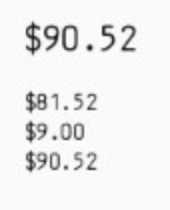
numbers <- tesseract(options = list(tessedit_char_whitelist = "$.0123456789"))cat(ocr("https://jeroen.github.io/images/receipt.png", engine = numbers))## $90.52## $81.52## $9.00## $90.52To test if this actually works, look what happens if we remove the$ fromtessedit_char_whitelist:
# Do not allow any dollar sign numbers2 <- tesseract(options = list(tessedit_char_whitelist = ".0123456789"))cat(ocr("https://jeroen.github.io/images/receipt.png", engine = numbers2))## 90.52## 81.52## 9.00## 90.52