


tidyCDISC is a shiny app to easily create custom tablesand figures from ADaM-ish data sets.

One oftidyCDISC’s goals is to develop clinical tablesthat meet table standards leveraged for submission filings, called“standard analyses”. However, this is secondary to the app’s primarypurpose: providing rich exploratory capabilities for clinical studies.High-level features of the app allow users to produce customized tablesusing a point-and-click interface, examine trends in patient populationswith dynamic figures, and supply visualizations that narrow in on asingle patient profile.
The beauty of the application: users don’t have to write a lick ofcode to gather abundant insights from their study data. Thus,tidyCDISC aims to serve a large population of clinicalpersonnel with varying levels of programming experience. Forexample:
Aclinical head, with presumably no programmingexperience (but the most domain expertise) can explore results withoutasking a statistician or programmer to build tables &figures.
Astatistician can use the application to maketables / figures instantly, cutting down on excess statisticalprogramming requests for tables that aren’t required, but are “nice tosee”.
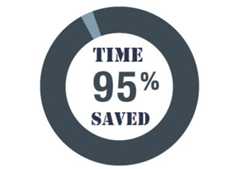
tidyCDISC to perform preliminary QC programming prior towriting their own code in a validated process. Users who leveragetidyCDISC for routine trial analysis reportsignificant time savings, about 95% on average, whenperforming their programming duties.For a high-level overview of the app with brief 10-minute demo,please review the following presentation ontidyCDISCatShiny Conf 2022:

As previously mentioned,tidyCDISC can only accept datasets that conform to CDISC ADaM standards with some minor flexibility(seeuploadrequirements for more details). At this time, the app is designed toacceptsas7bdat files only.
If you’re looking to regularly generate R code for tables, thetidyCDISC app offers a handy feature to export an R scriptfor full reproducibility of analyses performed in the app.
You can start using the demo version of the app here:tidyCDISC. Note thedemo version disables theData Upload feature and,instead, uses CDISC pilot data. If you’d like to upload your own studydata, we recommend installingtidyCDISC from CRAN(instructions below) to run the app locally or deploy it in yourpreferred environment. Please review the “GetStarted” guide to follow an example use case with the app. However,to optimize one’s use oftidyCDISC, we highly recommendreading the following articles that take a deeper look into the topicspresented in the “Get Started” tutorial:
We’re confident thetidyCDISC application can save youtime. If there is some use case thattidyCDISC can’t solve,we want to know about it. Please send thedevelopersa message with your question or request!
tidyCDISC R packageAs a reminder, you can start using the demo version of the app rightnow:launchtidyCDISC without any installation required. However, if you chooseto upload your own study data OR export & run R code from the TableGenerator, you will need thetidyCDISC package installed onyour machine. Execute the following code to install the package:
# Install from CRANinstall.packages("tidyCDISC")# Or install the latest dev versionremotes::install_github("Biogen-Inc/tidyCDISC")With a simplelibrary(tidyCDISC) you can access all theexported functions fromtidyCDISC that help users reproduceanalysis performed in the app. Or, you can run the application locally(or deploy it in anapp.R file) using:
# Launch the applicationtidyCDISC::run_app()tidyCDISC is an actively developed project, so thingsare frequently changing. As such, there are a number of ways to staycurrent with the latest changes in any user workflows & methods fornew (or past) releases! First,ourblog covers all the new features and squashed bugs with detailedvisuals and explanations to help you get up to speed. In addition, wehave aYouTubechannel that posts explain-er videos for special how-to’s, tips, andtechniques. Last, theNEWSfile is a great resource for a recap on all the changes, with linksto issues and actual code changes available for your review.


Happy exploring!