
cspp is a package designed to allow a user with onlybasic knowledge of R to find variables on state politics and policy,create and export datasets from these variables, subset the datasets bystates and years, create map visualizations, and export citations tocommon file formats (e.g.,.bib). An associated webapplication is availablehere.
Recent Updates:
– Added integration withcsppData to allow use of themost recent CSPP data (version 2.4)
– Added thecorr_plot function which allows the creationof correlation plots and correlation matrices.
– Added theplot_panel function which facilitates thecreation of timeseries plots.
– Added thecore argument to theget_cspp_data function. Set it toTRUE tomerge in common and important variables from the CSPP data. Useful forteaching purposes.
– Added integration with csppData, a package we created to hold theCorrelates of State Policy Project data and codebook. The CSPP data isnot provided with this package now. It instead automatically loads thecsppData package and its data.
The Correlates of StatePolicy
TheCorrelates of State Policy Project compiles more than 2,000variables across 50 states (+ DC) from 1900-2020. The variables cover 16broad categories:
- Demographics and Population
- Economic and Fiscal Policy
- Government
- Elections
- Policy Scores and Public Opinion
- Criminal Justice and the Legal System
- Education
- Healthcare and Health Insurance
- Welfare Policy
- Rights and Anti-Discrimination Protections
- Environment
- Drug and Alcohol Policy
- Gun Control
- Labor
- Transportation
- Regulatory Policy
Basic Use:Finding and Returning State Politics Data
# For latest developmental verison:library(devtools)devtools::install_github("correlatesstatepolicy/cspp")# For CRAN version:install.packages("cspp")The primary functions in this package areget_var_infoandget_cspp_data. The basic workflow for using thispackage is to 1) find variables of interest and 2) pull them from thefull data into a dataframe within the R environment. Below is a basicworking example.
# Load the packagelibrary(cspp)# Find variables based on a categorydemo_variables<-get_var_info(categories ="demographics")# Use these variables to get a full or subsetted version of the datacspp_data<-get_cspp_data(vars = demo_variables$variable,years =seq(2000,2010))Theget_cspp_data function returns a properly formattedstate-year panel, facilitating regressions and merging based on commonstate identifiers.
library(dplyr)glimpse(cspp_data[1:15],)#> Rows: 561#> Columns: 15#> $ st <chr> "AK", "AK", "AK", "AK", "AK", "AK", "AK", "AK", "AK", "A…#> $ stateno <dbl> 2, 2, 2, 2, 2, 2, 2, 2, 2, 2, 2, 1, 1, 1, 1, 1, 1, 1, 1,…#> $ state <chr> "Alaska", "Alaska", "Alaska", "Alaska", "Alaska", "Alask…#> $ state_fips <dbl> 2, 2, 2, 2, 2, 2, 2, 2, 2, 2, 2, 1, 1, 1, 1, 1, 1, 1, 1,…#> $ state_icpsr <dbl> 81, 81, 81, 81, 81, 81, 81, 81, 81, 81, 81, 41, 41, 41, …#> $ year <dbl> 2000, 2001, 2002, 2003, 2004, 2005, 2006, 2007, 2008, 20…#> $ poptotal <dbl> 627428, 633160, 642391, 650426, 660975, 668625, 676301, …#> $ popdensity <dbl> NA, NA, NA, NA, NA, NA, NA, NA, NA, NA, NA, NA, NA, NA, …#> $ popfemale <dbl> 302820, NA, 310665, 313539, 316525, 320479, 323642, 3286…#> $ pctpopfemale <dbl> NA, NA, NA, NA, NA, NA, NA, NA, NA, NA, NA, NA, NA, NA, …#> $ popmale <dbl> 324112, NA, 333121, 335279, 338910, 343182, 346411, 3548…#> $ pctpopmale <dbl> NA, NA, NA, NA, NA, NA, NA, NA, NA, NA, NA, NA, NA, NA, …#> $ popunder5 <dbl> 47591, NA, 49477, 48680, 49758, 50741, 49771, 51311, 520…#> $ pctpopunder14 <dbl> NA, NA, NA, NA, NA, NA, NA, NA, NA, NA, NA, NA, NA, NA, …#> $ pop5to17 <dbl> 143126, NA, 142951, 140609, 138471, 137583, 131663, 1309…Even more generally, you can load the entire set of variables and/orthe entire set of data (all 900+ variables) into R through passing thesefunctions without any parameters:
# All variablesall_variables<-get_var_info()# Full datasetall_data<-get_cspp_data()#> Note: the following variables have additional footnotes in the codebook (https://ippsr.msu.edu/sites/default/files/CorrelatesCodebook.pdf):#> bfh_cpi_multiplier, gov_fin_fy, housing_prices_quar, noofvotes, cartheftrate, carthefttotal, murderrate, murdertotal, propcrimerate, propcrimetotal, raperate, rapetotal, bus_energy_consum, bus_energy_consum_pcFinding Variables
Given the large number of variables in the data, we provideadditional functionality withinget_var_info to search forvariables based on strings or categories. For instance, the followingsearches forpop andfemal within the variablename, returning 31 variables:
# Search for variables by nameget_var_info(var_names =c("pop","femal"))%>% dplyr::glimpse()#> Rows: 43#> Columns: 14#> $ variable <chr> "poptotal", "popdensity", "popfemale", "pctpopfemale",…#> $ years <chr> "1900-2019", "1975-1999", "1994-2000, 2002-2010", "201…#> $ short_desc <chr> "Population total", "Population density", "Female popu…#> $ long_desc <chr> "Total population per state", "Number of people per sq…#> $ sources <chr> "U.S. Census Bureau (http://www.census.gov/)\r\nOrigin…#> $ category <chr> "demographics", "demographics", "demographics", "demog…#> $ plaintext_cite <chr> "Stateminder: A data visualization project from George…#> $ bibtex_cite <chr> "@misc{stateminderNA,\n title={Stateminder.org},\n a…#> $ plaintext_cite2 <chr> NA, NA, NA, NA, NA, NA, NA, NA, NA, NA, NA, NA, NA, NA…#> $ bibtex_cite2 <chr> NA, NA, NA, NA, NA, NA, NA, NA, NA, NA, NA, NA, NA, NA…#> $ plaintext_cite3 <chr> NA, NA, NA, NA, NA, NA, NA, NA, NA, NA, NA, NA, NA, NA…#> $ bibtex_cite3 <chr> NA, NA, NA, NA, NA, NA, NA, NA, NA, NA, NA, NA, NA, NA…#> $ plaintext_cite4 <chr> NA, NA, NA, NA, NA, NA, NA, NA, NA, NA, NA, NA, NA, NA…#> $ bibtex_cite4 <chr> NA, NA, NA, NA, NA, NA, NA, NA, NA, NA, NA, NA, NA, NA…A similar line of code using therelated_to parameter,instead ofvar_name, searches within the nameand the description fields, returning 96 results:
# Search by name and description:get_var_info(related_to =c("pop","femal"))%>% dplyr::glimpse()#> Rows: 139#> Columns: 14#> $ variable <chr> "poptotal", "popdensity", "popfemale", "pctpopfemale",…#> $ years <chr> "1900-2019", "1975-1999", "1994-2000, 2002-2010", "201…#> $ short_desc <chr> "Population total", "Population density", "Female popu…#> $ long_desc <chr> "Total population per state", "Number of people per sq…#> $ sources <chr> "U.S. Census Bureau (http://www.census.gov/)\r\nOrigin…#> $ category <chr> "demographics", "demographics", "demographics", "demog…#> $ plaintext_cite <chr> "Stateminder: A data visualization project from George…#> $ bibtex_cite <chr> "@misc{stateminderNA,\n title={Stateminder.org},\n a…#> $ plaintext_cite2 <chr> NA, NA, NA, NA, NA, NA, NA, NA, NA, NA, NA, NA, NA, NA…#> $ bibtex_cite2 <chr> NA, NA, NA, NA, NA, NA, NA, NA, NA, NA, NA, NA, NA, NA…#> $ plaintext_cite3 <chr> NA, NA, NA, NA, NA, NA, NA, NA, NA, NA, NA, NA, NA, NA…#> $ bibtex_cite3 <chr> NA, NA, NA, NA, NA, NA, NA, NA, NA, NA, NA, NA, NA, NA…#> $ plaintext_cite4 <chr> NA, NA, NA, NA, NA, NA, NA, NA, NA, NA, NA, NA, NA, NA…#> $ bibtex_cite4 <chr> NA, NA, NA, NA, NA, NA, NA, NA, NA, NA, NA, NA, NA, NA…You can also return whole categories of variables. The full list ofvariable categories is available within the help file for?get_cspp_data. You can alternatively see the list ofcategories through the below snippet of code.
# See variable categories:unique(get_var_info()$category)#> [1] "demographics" "economic-fiscal" "government" "elections"#> [5] "policy-ideology" "criminal justice" "education" "healthcare"#> [9] "welfare" "rights" "environment" "drug-alcohol"#> [13] "gun control" "labor" "transportation" "misc. regulation"# Find variables by category:var_cats<-get_var_info(categories =c("gun control","labor"))You can then use the variable column in this dataframe to pull datafromget_cspp_data throughvar_cats$variable,an example of which is below.
Another option in finding a variable is to load the variables into adataframe and use RStudio’s filter feature to search:

Pulling data
The functionget_cspp_data takes the followingparameters, all of which are optional:
vars- The specific (exact match) variable(s) to pull.Takes a single variable or a vector of variable names.var_category- The category or categories from which topull. Takes a single category or vector of categories from the 16 listedabove.states- Select which states to grab data from. Statesmust be abbreviated and can take a vector or individual state. See?state.abbfor an easy way to load stateabbreviations.years- Takes a single year or a vector or sequence ofyears, such asseq(2001, 2005).output- Choose to write the resulting dataframestraight to a file. Optional outputs includecsv,dta, orrdata.path- If outputting the file, choose where to write itto. If left blank, the file will save to your working directory.
In this example, the resulting dataframe includes the variablesc("sess_length", "hou_majority", "term_length") as well asall variables in the categorydemographics for NorthCarolina, Virgina, and Georgia from 1994 to 2004.
# Get subsetted data and save to dataframedata<-get_cspp_data(vars =c("sess_length","hou_majority","term_length"),var_category ="demographics",states =c("NC","VA","GA"),years =seq(1995,2004))You can also pass theget_var_info function into thevars parameter ofget_cspp_data, skipping astep:
# Use get_var_info to generate variable vector inlineget_cspp_data(vars =get_var_info(related_to ="concealed carry")$variable,states ="NC",years =1999)#> # A tibble: 1 × 8#> st stateno state state_fips state_icpsr year bjourn bprecc#> <chr> <dbl> <chr> <dbl> <dbl> <dbl> <dbl> <dbl>#> 1 NC 33 North Carolina 37 47 1999 2 1Where the two returned variables,bjourn andbprecc, deal with concealed carry of guns in motor vehiclesand whether state laws pre-empt local laws, respectively.
Citations
Each variable in the CSPP data was collected from external sources.We’ve made it easy to cite the source of each variable you use with theget_cites function.
This function takes a variable name or vector of variable names (suchas that generated by theget_var_info function) and returnsa dataframe of citations.
# Simple dataframe for one variableget_cites(var_names ="poptotal")%>% dplyr::glimpse()#> Rows: 3#> Columns: 12#> $ variable <chr> "poptotal", "cspp_dataset", "cspp_package"#> $ plaintext_cite <chr> "Stateminder: A data visualization project from George…#> $ bibtex_cite <chr> "@misc{stateminderNA,\n title={Stateminder.org},\n a…#> $ plaintext_cite2 <chr> NA, NA, NA#> $ bibtex_cite2 <chr> NA, NA, NA#> $ plaintext_cite3 <chr> NA, NA, NA#> $ bibtex_cite3 <chr> NA, NA, NA#> $ years <chr> "1900-2019", NA, NA#> $ short_desc <chr> "Population total", NA, NA#> $ long_desc <chr> "Total population per state", NA, NA#> $ sources <chr> "U.S. Census Bureau (http://www.census.gov/)\r\nOrigin…#> $ category <chr> "demographics", NA, NA# Using get_var_info to return variable citationscite_ex<-get_cites(var_names =get_var_info(related_to ="concealed carry")$variable)cite_ex$plaintext_cite[3:4]#> [1] "Jordan, Marty P. and Matt Grossmann. 2020. The Correlates of State Policy Project v.2.2. East Lansing, MI: Institute for Public Policy and Social Research (IPPSR)."#> [2] "Caleb Lucas and Joshua McCrain (2020). cspp: A Package for The Correlates of State Policy Project Data. R package version 0.1.0."There is also an option to output the citations to a .bib, .csv or.txt file:
get_cites(var_names ="poptotal",write_out =TRUE,file_path ="~/path/to/file.csv",format ="csv")Maps and Choropleths
Thegenerate_map function uses the CSPP data to generateUS maps with states filled in based on the value of a given variable(also called choropleths). This function returns aggplotobject so it is highly customizable. The optional parameters are:
cspp_data- A dataframe ideally generated by theget_cspp_datafunction. Any dataframe will work as long asit has the columnsst.abb,year, and anyadditional column from which to fill in the map.var_name- The specific variable to use to fill in themap. If left blank, it will take the first column afteryearandst.abb.average_years- Default is FALSE. If set to TRUE, thisreturns a map that averages over all of the years per state in thedataframe. So if there are multiple years of population per state, itplots the average population per state in the panel.drop_NA_states- By default, the function keeps statesthat are missing data, resulting in them being filled in as gray. Ifthis is set to TRUE, the states are dropped. See the example below.poly_args- A list of arguments that determine theaesthetics of state shapes. Seeggplot2::geom_polygonforoptions.
Note: This function will attempt to plot anyvariable type; however, plotting character or factor values on a mapwill likely result in a hard to interpret graph.
library(ggplot2)# optional, but needed to remove legend# Generates a map of the percentage of the population over 65generate_map(get_cspp_data(var_category ="demographics"),var_name ="pctpopover65")+ ggplot2::theme(legend.position ="none")
In this example, since the dataframe passed is generated byget_cspp_data(var_category = "demographics") and containsall years for all states in the data, the function by default returnsthe value of the most recent year without missing data.
If you setdrop_NA_states to TRUE, and pass the functiona dataframe containing only certain states, it only plots thosestates:
library(dplyr)generate_map(get_cspp_data(var_category ="demographics")%>% dplyr::filter(st%in%c("NC","VA","SC")),var_name ="pctpopover65",poly_args =list(color ="black"),drop_NA_states =TRUE)+ ggplot2::theme(legend.position ="none")
Since this function returns aggplot object, you cancustomize it endlessly:
generate_map(get_cspp_data(var_category ="demographics")%>% dplyr::filter(st%in%c("NC","VA","SC","TN","GA","WV","MS","AL","KY")),var_name ="pctpopover65",poly_args =list(color ="black"),drop_NA_states =TRUE)+ ggplot2::scale_fill_gradient(low ="white",high ="red")+ ggplot2::theme(legend.position ="none")+ ggplot2::ggtitle("% Population Over 65")
Plot timeseries data
To facilitate the visualization of the timeseries and panel nature ofthe CSPP data, theplot_panel function takes a dataframefromget_cspp_data and plots a state-year panel in one oftwo formats. The parameters of this function are as follows:
cspp_data- a dataframe generated byget_cspp_dataor, alternatively, a dataframe with thecolumnsst.abb,year, plus one othervariable.var_name- the name of the variable to be plotted.years- the years to include in the panel.colors- three color values that are used in the plot.The first color takes the lowest values of the variable, the second thehighest, and the third is the color used for NA values.plot_type- one of “grid” or “line”. Defaults to“grid”. Both are displayed next.
The function returns aggplot2 object, making it easierto change and add layers onto the generated plot.
A common research design is to use variation in policy adoption as a‘treatment’ in a pseudo-experimental setting. This function makes iteasy to visualize when states are subject to this treatment.
# panel of all states' adoption of medical marijuana lawscspp<-get_cspp_data(vars ="drugs_medical_marijuana")# visualize panel:plot_panel(cspp)#> Values from drugs_medical_marijuana used to fill cells.
The function also works with continuous variables, such as the statepolicy liberalism score:
plot_panel(cspp_data =get_cspp_data(vars ="pollib_median"),colors =c("firebrick4","steelblue2","gray"),years =seq(1960,2010))+ ggplot2::ggtitle("Policy liberalism")#> Values from pollib_median used to fill cells.
Correlation Plots andMatrices
Thecorr_plot function geneates a correlation plot (inthe style of a heat map) usingggcorrplot. Alternately, itoutputs a correlation matrix for users to pass onto their ownggcorrplot call for further customization.
This function takes the following parameters: *data - adataframe. If generated byget_cspp_data, the function willwork automatically. Otherwise, this function parses all numeric columnsin the passed dataframe. *vars- a vector of variable namesto generate correlations between. *summarize - whether tocreate state specific means for each variable. If set to TRUE, passeddataframe must contain the columnst.abb. If FALSE, it willtreat each observation independently in generating correlations. *labels - whether to include labels on the correlation plotof the specific correlation value. *label_size - the fontsize of the labels. *colors - a vector of three colorsthat form the gradient in the plot. *cor_matrix - if setto TRUE, instead of returning a ggplot object this function returns acorrelation matrix.
corr_plot(data =get_cspp_data(years =seq(1990,2010)),vars =c("pollib_median","innovatescore_boehmkeskinner","citi6013","ranney4_control","h_diffs"),colors =c("dodgerblue","white","firebrick")) Alternatively, you can use similar code to generate a correlationmatrix:
corr_plot(data =get_cspp_data(years =seq(1990,2010)),vars =c("pollib_median","innovatescore_boehmkeskinner","citi6013","ranney4_control","h_diffs"),cor_matrix =TRUE)#> pollib_median innovatescore_boehmkeskinner#> pollib_median 1.0 0.3#> innovatescore_boehmkeskinner 0.3 1.0#> citi6013 0.8 0.2#> ranney4_control 0.4 0.4#> h_diffs 0.2 0.2#> citi6013 ranney4_control h_diffs#> pollib_median 0.8 0.4 0.2#> innovatescore_boehmkeskinner 0.2 0.4 0.2#> citi6013 1.0 0.4 -0.1#> ranney4_control 0.4 1.0 -0.1#> h_diffs -0.1 -0.1 1.0Network data
The functionget_network_data returns a dataset from theCSPP statenetworks data consisting of 120 variables. The data is structured asstate dyads (an edge list).
# Returns dataframe of state dyadsget_network_data()%>% dplyr::glimpse()#> Rows: 2,550#> Columns: 120#> $ State1 <chr> "Alabama", "Alabama", "Alabama", "Alabama",…#> $ State2 <chr> "Alaska", "Arizona", "Arkansas", "Californi…#> $ st.abb2 <chr> "AK", "AZ", "AR", "CA", "CO", "CT", "DE", "…#> $ st.abb1 <chr> "AL", "AL", "AL", "AL", "AL", "AL", "AL", "…#> $ dyadid <chr> "AL-AK", "AL-AZ", "AL-AR", "AL-CA", "AL-CO"…#> $ S1region <chr> "South", "South", "South", "South", "South"…#> $ S2region <chr> "West", "West", "South", "West", "West", "N…#> $ S1division <chr> "East South Central", "East South Central",…#> $ S2division <chr> "Pacific", "Mountain", "West South Central"…#> $ Border <dbl> 0, 0, 0, 0, 0, 0, 0, 0, 1, 1, 0, 0, 0, 0, 0…#> $ Distance <dbl> 4594.3668, 2407.6648, 620.4273, 3243.6837, …#> $ State1_Lat <dbl> 32.36154, 32.36154, 32.36154, 32.36154, 32.…#> $ State1_Long <dbl> -86.27912, -86.27912, -86.27912, -86.27912,…#> $ State2_Lat <dbl> 58.30194, 33.44846, 34.73601, 38.55560, 39.…#> $ State2_Long <dbl> -134.41974, -112.07384, -92.33112, -121.468…#> $ ACS_Migration <dbl> 528, 1005, 926, 3107, 1251, 327, 113, 99, 1…#> $ PopDif <dbl> 4088469, -2116015, 1850948, -34266641, -722…#> $ State1_Pop <dbl> 4819343, 4819343, 4819343, 4819343, 4819343…#> $ State2_Pop <dbl> 730874, 6935358, 2968395, 39085984, 5542282…#> $ IncomingFlights <dbl> 75, 0, 0, 72, 51, 328, 0, 0, 0, 606, 0, 77,…#> $ IRS_migration <dbl> 7698, 15051, 17858, 61401, 19956, 6408, 252…#> $ Income <dbl> 147372, 339243, 371553, 1364538, 445755, 18…#> $ IRS_migration_2010 <dbl> 528, 1005, 926, 3107, 1251, 327, 113, 99, 1…#> $ Income_2010 <dbl> 9214, 23289, 18692, 66991, 25235, 9019, 236…#> $ Imports <dbl> 2.997198e+05, 2.065025e+09, 2.033900e+09, 4…#> $ GSPDif <dbl> 155221, -100224, 84242, -2417106, -117019, …#> $ S1GSP <dbl> 205625, 205625, 205625, 205625, 205625, 205…#> $ S2GSP <dbl> 50404, 305849, 121383, 2622731, 322644, 259…#> $ DemDif <dbl> -0.07857143, -0.14523810, -0.06571428, -0.3…#> $ S1AvgDem <dbl> 0.2714286, 0.2714286, 0.2714286, 0.2714286,…#> $ S2AvgDem <dbl> 0.3500000, 0.4166667, 0.3371429, 0.6375000,…#> $ S1SenDemProp <dbl> 0.2285714, 0.2285714, 0.2285714, 0.2285714,…#> $ S1HSDemProp <dbl> 0.3142857, 0.3142857, 0.3142857, 0.3142857,…#> $ S2SenDemProp <dbl> 0.3000000, 0.4333333, 0.3142857, 0.6250000,…#> $ S2HSDemProp <dbl> 0.4000000, 0.4000000, 0.3600000, 0.6500000,…#> $ IdeologyDif <dbl> 0.31610168, 0.06866579, -0.11840535, -0.213…#> $ PIDDif <dbl> 0.14324945, -0.10957587, -0.15900619, -0.27…#> $ S1Ideology <dbl> -0.03389831, -0.03389831, -0.03389831, -0.0…#> $ S1PID <dbl> -0.3304348, -0.3304348, -0.3304348, -0.3304…#> $ S2Ideology <dbl> -0.34999999, -0.10256410, 0.08450704, 0.179…#> $ S2PID <dbl> -0.47368422, -0.22085890, -0.17142858, -0.0…#> $ policy_diffusion_tie <dbl> 0, 20, 7, 5, 1, 5, 56, NA, 15, 40, 0, 19, 5…#> $ policy_diffusion_2015 <dbl> 0, 1, 0, 1, 0, 0, 1, NA, 1, 1, 0, 1, 1, 0, …#> $ policy_diffusion_2000.2015 <dbl> 0, 7, 0, 5, 0, 3, 16, NA, 13, 16, 0, 16, 15…#> $ LibDif <dbl> NA, 34.186113, 2.949804, 46.088120, 44.4234…#> $ ELibDif <dbl> NA, 1.230781, -2.156186, -3.115099, 8.00975…#> $ SLibDif <dbl> NA, -32.955332, -0.793618, -42.973021, -36.…#> $ S1EconomicLiberalism <dbl> -0.0384034, -0.0384034, -0.0384034, -0.0384…#> $ S1SocialLiberalism <dbl> -0.2714913, -0.2714913, -0.2714913, -0.2714…#> $ S2EconomicLiberalism <dbl> NA, -0.05071121, -0.01684154, -0.00725241, …#> $ S2SocialLiberalism <dbl> NA, 0.05806200, -0.26355514, 0.15823889, 0.…#> $ MassSocLibDif <dbl> -0.38336566, 0.08869284, -1.38085590, -2.22…#> $ MassEconLibDif <dbl> -0.06364249, -0.14963306, -0.07359393, -0.5…#> $ PolSocLibDif <dbl> -1.4865111, 0.2728079, -0.9492451, -4.20959…#> $ PolEconLibDif <dbl> -1.1890527, -0.2309994, -0.1488198, -2.9290…#> $ State1PolSocLib <dbl> -1.577025, -1.577025, -1.577025, -1.577025,…#> $ State1PolEconLib <dbl> -1.370212, -1.370212, -1.370212, -1.370212,…#> $ State1MassSocLib <dbl> 0.07021931, 0.07021931, 0.07021931, 0.07021…#> $ State1MassEconLib <dbl> -0.5247536, -0.5247536, -0.5247536, -0.5247…#> $ State2PolSocLib <dbl> -0.090514018, -1.849832972, -0.627779955, 2…#> $ State2PolEconLib <dbl> -0.18115938, -1.13921271, -1.22139223, 1.55…#> $ State2MassSocLib <dbl> 0.45358497, -0.01847353, 1.45107521, 2.2920…#> $ State2MassEconLib <dbl> -0.4611111, -0.3751206, -0.4511597, 0.01890…#> $ perceived_similarity <dbl> 0.116279073, 0.067307696, 0.343750000, 0.00…#> $ RaceDif <dbl> 50.6, 66.0, 22.0, 97.9, 44.8, 33.5, 16.7, 5…#> $ LatinoDif <dbl> -2.9, -27.3, -3.3, -35.0, -17.4, -12.0, -5.…#> $ WhiteDif <dbl> 4.9, 10.8, -6.8, 28.5, -2.7, -1.2, 3.3, 29.…#> $ BlackDif <dbl> 23.8, 22.6, 11.5, 21.2, 22.8, 16.8, 5.2, -1…#> $ AsianDif <dbl> -5.3, -1.9, -0.3, -13.1, -1.8, -3.2, -2.7, …#> $ NativeDif <dbl> -13.7, -3.4, -0.1, 0.1, -0.1, 0.3, 0.3, 0.3…#> $ S1Latino <dbl> 0.041, 0.041, 0.041, 0.041, 0.041, 0.041, 0…#> $ S1White <dbl> 0.655, 0.655, 0.655, 0.655, 0.655, 0.655, 0…#> $ S1Black <dbl> 0.267, 0.267, 0.267, 0.267, 0.267, 0.267, 0…#> $ S1Asian <dbl> 0.013, 0.013, 0.013, 0.013, 0.013, 0.013, 0…#> $ S1Native <dbl> 0.005, 0.005, 0.005, 0.005, 0.005, 0.005, 0…#> $ S2Latino <dbl> 0.070, 0.314, 0.074, 0.391, 0.215, 0.161, 0…#> $ S2White <dbl> 0.606, 0.547, 0.723, 0.370, 0.682, 0.667, 0…#> $ S2Black <dbl> 0.029, 0.041, 0.152, 0.055, 0.039, 0.099, 0…#> $ S2Asian <dbl> 0.066, 0.032, 0.016, 0.144, 0.031, 0.045, 0…#> $ S2Native <dbl> 0.142, 0.039, 0.006, 0.004, 0.006, 0.002, 0…#> $ ReligDif <dbl> 74, 77, 23, 89, 58, 94, 81, 74, 63, 22, 77,…#> $ ChristianDif <dbl> 24, 19, 7, 23, 22, 16, 17, 21, 16, 7, 23, 1…#> $ EvangelicalDif <dbl> 27, 23, 3, 29, 23, 36, 34, 35, 25, 11, 24, …#> $ MainlineDif <dbl> 1, 1, -3, 3, -2, -4, -8, -2, -1, 1, 2, -3, …#> $ BPDif <dbl> 13, 15, 8, 14, 14, 11, 6, 4, 8, -1, 14, 16,…#> $ CatholicDif <dbl> -9, -14, -1, -21, -9, -26, -15, -12, -14, -…#> $ MormonDif <dbl> -4, -4, 0, 0, -1, 0, 1, 0, 0, 0, -2, -18, 1…#> $ JewishDif <dbl> 0, -2, 0, -2, -1, -3, -3, -4, -3, -1, 0, 0,…#> $ MuslimDif <dbl> 0, -1, -2, -1, 0, -1, -1, -2, 0, 0, 0, -1, …#> $ BuddhistDif <dbl> -1, -1, 0, -2, -1, -1, 0, -2, 0, 0, -8, 0, …#> $ HinduDif <dbl> 0, -1, 0, -2, 0, -1, -2, -1, 0, 0, 0, 0, -1…#> $ NonesDif <dbl> -19, -15, -6, -15, -7, -11, -11, -12, -12, …#> $ NPDif <dbl> -11, -10, -4, -9, -11, -5, -9, -7, -8, -4, …#> $ ReligiosityDif <dbl> 32, 24, 7, 28, 30, 34, 25, 24, 23, 11, 30, …#> $ S1Christian <dbl> 0.86, 0.86, 0.86, 0.86, 0.86, 0.86, 0.86, 0…#> $ S1Evangelical <dbl> 0.49, 0.49, 0.49, 0.49, 0.49, 0.49, 0.49, 0…#> $ S1Mainline <dbl> 0.13, 0.13, 0.13, 0.13, 0.13, 0.13, 0.13, 0…#> $ S1BlackProt <dbl> 0.16, 0.16, 0.16, 0.16, 0.16, 0.16, 0.16, 0…#> $ S1Catholic <dbl> 0.07, 0.07, 0.07, 0.07, 0.07, 0.07, 0.07, 0…#> $ S1Mormon <dbl> 0.01, 0.01, 0.01, 0.01, 0.01, 0.01, 0.01, 0…#> $ S1Jewish <dbl> 0, 0, 0, 0, 0, 0, 0, 0, 0, 0, 0, 0, 0, 0, 0…#> $ S1Muslim <dbl> 0, 0, 0, 0, 0, 0, 0, 0, 0, 0, 0, 0, 0, 0, 0…#> $ S1Buddhist <dbl> 0, 0, 0, 0, 0, 0, 0, 0, 0, 0, 0, 0, 0, 0, 0…#> $ S1Hindu <dbl> 0, 0, 0, 0, 0, 0, 0, 0, 0, 0, 0, 0, 0, 0, 0…#> $ S1Nones <dbl> 0.12, 0.12, 0.12, 0.12, 0.12, 0.12, 0.12, 0…#> $ S1NothingParticular <dbl> 0.09, 0.09, 0.09, 0.09, 0.09, 0.09, 0.09, 0…#> $ S1HighlyReligious <dbl> 0.77, 0.77, 0.77, 0.77, 0.77, 0.77, 0.77, 0…#> $ S2Christian <dbl> 0.62, 0.67, 0.79, 0.63, 0.64, 0.70, 0.69, 0…#> $ S2Evangelical <dbl> 0.22, 0.26, 0.46, 0.20, 0.26, 0.13, 0.15, 0…#> $ S2Mainline <dbl> 0.12, 0.12, 0.16, 0.10, 0.15, 0.17, 0.21, 0…#> $ S2BlackProt <dbl> 0.03, 0.01, 0.08, 0.02, 0.02, 0.05, 0.10, 0…#> $ S2Catholic <dbl> 0.16, 0.21, 0.08, 0.28, 0.16, 0.33, 0.22, 0…#> $ S2Mormon <dbl> 0.05, 0.05, 0.01, 0.01, 0.02, 0.01, 0.00, 0…#> $ S2Jewish <dbl> 0.00, 0.02, 0.00, 0.02, 0.01, 0.03, 0.03, 0…#> $ S2Muslim <dbl> 0.00, 0.01, 0.02, 0.01, 0.00, 0.01, 0.01, 0…#> $ S2Buddhist <dbl> 0.01, 0.01, 0.00, 0.02, 0.01, 0.01, 0.00, 0…#> $ S2Hindu <dbl> 0.00, 0.01, 0.00, 0.02, 0.00, 0.01, 0.02, 0…#> $ S2Nones <dbl> 0.31, 0.27, 0.18, 0.27, 0.19, 0.23, 0.23, 0…#> $ S2NothingParticular <dbl> 0.20, 0.19, 0.13, 0.18, 0.20, 0.14, 0.18, 0…#> $ S2HighlyReligious <dbl> 0.45, 0.53, 0.70, 0.49, 0.47, 0.43, 0.52, 0…The function has two optional parameterscategory andmerge_data. If a category or string of categories isspecified, it returns variables only in that category (see the datadocumentation in the link above). Category options are “Distance TravelMigration”, “Economic”, “Political”, “Policy”, “Demographic”.
network.df<-get_network_data(category =c("Economic","Political"))names(network.df)#> [1] "State1" "State2" "st.abb2"#> [4] "st.abb1" "dyadid" "IRS_migration"#> [7] "Income" "IRS_migration_2010" "Income_2010"#> [10] "Imports" "GSPDif" "S1GSP"#> [13] "S2GSP" "DemDif" "S1AvgDem"#> [16] "S2AvgDem" "S1SenDemProp" "S1HSDemProp"#> [19] "S2SenDemProp" "S2HSDemProp" "IdeologyDif"#> [22] "PIDDif" "S1Ideology" "S1PID"#> [25] "S2Ideology" "S2PID"merge_data simplifies merging in data from theget_cspp_data function. The object passed tomerge_data must be a dataframe with a variable namedst.abb, or a dataframe generated byget_cspp_data. If the dataframe passed to this parameterhas more than one observation per state (a panel) then this functionaverages over all values per state prior to merging.
cspp_data<-get_cspp_data(vars =c("sess_length","hou_majority"),years =seq(1999,2000))network.df<-get_network_data(category ="Distance Travel Migration",merge_data = cspp_data)#> Warning in get_network_data(category = "Distance Travel Migration", merge_data#> = cspp_data): There are multiple observations per state in the `data` dataframe.#> Creating one observation per state (dplyr::summarize()) prior to merging...names(network.df)#> [1] "State1" "State2" "st.abb2" "st.abb1"#> [5] "dyadid" "S1region" "S2region" "S1division"#> [9] "S2division" "Border" "Distance" "State1_Lat"#> [13] "State1_Long" "State2_Lat" "State2_Long" "ACS_Migration"#> [17] "PopDif" "State1_Pop" "State2_Pop" "IncomingFlights"#> [21] "sess_length" "hou_majority"library(dplyr)cspp_data%>%arrange(st)%>%head()#> # A tibble: 6 × 8#> st stateno state state_fips state_icpsr year sess_length hou_majority#> <chr> <dbl> <chr> <dbl> <dbl> <dbl> <dbl> <dbl>#> 1 AK 2 Alaska 2 81 1999 168. 0.752#> 2 AK 2 Alaska 2 81 2000 NA 0.752#> 3 AL 1 Alabama 1 41 1999 60 -0.129#> 4 AL 1 Alabama 1 41 2000 NA -0.115#> 5 AR 4 Arkansas 5 42 1999 63.2 0.118#> 6 AR 4 Arkansas 5 42 2000 NA 0.118# the merged value of Alaska's hou_majority value will be mean(c(-0.129, -0.115))Network Plotting Examples
Here are two examples of plotting the state network edgelist datausingigraph andggraph:
library(ggraph)library(igraph)network.df<-select(network.df,from = st.abb1,to = st.abb2, ACS_Migration)network.df%>%filter(from%in%c("NC","VA","SC","GA"))%>%graph_from_data_frame()%>%ggraph(layout="fr")+geom_edge_link(aes(edge_alpha = ACS_Migration),edge_color ="royalblue")+geom_node_point()+geom_node_text(aes(label = name),repel =TRUE,point.padding =unit(0.2,"lines"))+theme_void()+theme(legend.position ="none")
network.df%>%filter(from%in%c("NC"))%>%graph_from_data_frame()%>%ggraph(layout="linear")+geom_edge_arc(aes(edge_alpha = ACS_Migration),edge_color ="royalblue")+geom_node_text(aes(label = name),size =2)+theme_void()+theme(legend.position ="none")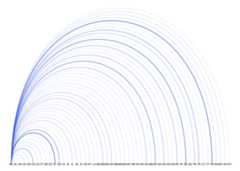
Citation
Caleb Lucas and Joshua McCrain (2020). cspp: A Package for TheCorrelates of State Policy Project Data. R package version 0.3.3.
Contact
Caleb Lucas -Political Scientist, RAND Corporation
Josh McCrain -Assistant Professor, University of Utah (Twitter)
[8]ページ先頭