
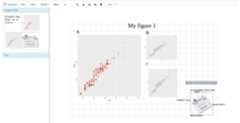
{drawer} is an interactive image editing tool that can be added aspart of the HTML in Shiny, R markdown or any type of HTML document.Often times, plots, photos are embedded in the web application/file.{drawer} can take screenshots of these image-like elements, or any partof the HTML document and send to an image editing space called “canvas”to allow users immediately edit the screenshot(s) within the samedocument. Users can quickly combine, compare different screenshots,upload their own images and maybe make a scientific figure.
| type | link |
|---|---|
| Pure HTML | hostedonline |
| Pure HTML (github) | downloadand open in your browser |
| Shiny | shinyapp.io |
| R markdown | syspipe.org |
Install release version from CRAN:
install.packages("drawer")Develop version:
if (!requireNamespace("remotes",quietly=TRUE))install.packages("remotes")remotes::install_github("lz100/drawer")Read details of drawer onour website.
{drawer} is originally part of systemPipeShiny (SPS), the SPS Canvasfunctionality. However, one cannot use it outside SPS framework andinstalling the whole SPS framework is heavy. To benefit more people intheir own apps/documents, we provide {drawer} as a separate package.
| Package | Description | Documents | Function reference | Demo |
|---|---|---|---|---|
 systemPipeShiny systemPipeShiny | SPS main package | website | link | demo |
 spsComps spsComps | SPS UI and server components | website | link | demo |
 drawer drawer | SPS interactive image editing tool | website | link | demo |
 spsUtil spsUtil | SPS utility functions | website | link | NA |