
サクサク読めて、
アプリ限定の機能も多数!
アプリで開く
Design Beautiful Websites Quickly Semantic is a development framework that helpscreate beautiful, responsive layouts using human-friendlyHTML. ConciseHTML SemanticUI treats words and classes as exchangeable concepts. Classes use syntax from natural languages like noun/modifier relationships, word order, and plurality to link concepts intuitively. Get the same benefits as BEM or SMACSS, but wit
本記事は2015年1月に開催されたHTML5 Conferenceでお話させていただいた、 「BeyondCSS Architecture」というCSS設計のセッションをフォローアップする記事です。本記事では、このセッションの概要と補足、またセッション中に説明できなかった点などについて書いていきます。 ※当日のセッションの動画・スライドも公開されているので、文末からご覧ください。CSSの難しさと、昨今のCSS設計事情 この近年、CSSにおける設計論というのが話題に出てくるようになりました。筆者も拙著『Web制作者のためのCSS設計の教科書』を書いたり、各地でCSS設計をテーマとした講演をする機会が多くありました。CSSの難しさというのは、石本氏によるCSSコードの評価についての記事にも書かれているのですが、CSSは良くも悪くも厳格なコード規約は少なく、ただ宣言的に書けばいいだけです

AboutHTML PreprocessorsHTML preprocessors can make writingHTML more powerful or convenient. For instance,Markdown is designed to be easier to write and read fortext documents and you could write a loop in Pug. Learn more · Versions Adding Classes In CodePen, whatever you write in theHTML editor is whatgoes within the <body> tags in a basicHTML5template. So you don't have access to higher-

経歴や会社の沿革ページに!簡単なCSSで実装するタイムラインちょうど今作っているサイトで、経歴をタイムラインで表現するページがあったのでコードを紹介。コード自体はとってもシンプルなので、カスタマイズ次第でどんなデザインのサイトにもあわせられると思います。文章にするとゴチャゴチャしがちな経歴・沿革をスッキリと表示しましょう! モバイルファーストってことで、640px 未満の幅のデバイスには年月・見出し・詳細文章を順に表示します。 モバイル版はこんな感じ。サンプルページの画面の幅を調整して比較してください。HTMLtimeline というクラスのついたリストの中の li タグで項目を追加していきます。 <ul class="timeline"> <li> <p class="timeline-date">2007年2月</p> <div class="timeline-content"> <

テキスト周りで使えるCSSの小技いろいろモバイルファーストの概念が広まり、コンテンツ主体の「読ませる」サイトが増えてきた昨今。テキスト周りをより便利に、より素敵に表示できるようなCSSをいくつか集めました。ユーザビリティの向上も図れるようなものもあるので要チェック!基本的なテクニックが中心なので、初心者さん〜中級者さんの参考になればと思います。 テキスト周りで使えるCSS の小技 目次テキストを選択する時の色を変更蛍光ペンで線を引いたような効果長いテキストを「…」で省略する番号リストの表現を変更リンクの種類でアイコン変える言語によってスタイルを変更テキストリンクのエフェクトプリント時は URL を表示長い URL を途中で折返す途中で折り返さず、次の行に先頭の文字を大きく先頭を一文字分あけるグラデーションテキストブラウザーは特記していなければChrome、Safari、Firefox、

スマートフォンサイトを制作する際、個人的に覚えておいた方が良いと思うCSSのプロパティやテクニックをまとめてみました。 自分用の備忘録ではありますが、他のブログ等でも取り上げられていることが多いので、いずれも覚えておいて損はないものだと思います。 普段から制作している方にとっては目新しいのはないと思いますが、まだスマートフォンサイトを制作したことがない方やまだまだ苦手だなと思う方は参考にしてみてください。 UA切り替え・Viewport指定・拡大縮小の有無・電話番号リンクの無効化・ホーム画面用のアイコン指定など、スマートフォンサイトを制作する際に最低限覚えておくべきと思うことは他にも沢山あるんですが、今回はCSSに焦点を当てています。 また、タイトルでは「スマートフォンサイト制作時」としてはいますが、レスポンシブWebデザイン制作時でも頻繁に使うものだったり、PCサイト制作時でもCSS3に


Show Up To Date Browser Compatibility Information In Your ArticlesJust 4kb! Download Now! If you've ever written an article aboutHTML5 webtechnologies, you'll appreciate how importantit can be to inform your readers which browsers thetechnology works with. The "When Can I Use" Web Widget provides authors with the ability to include up to date information about browser support for a feature th
General General hints and tips that don't fall in to any category.
Resources by ApplicationBootstrapTemplatesFigmaTemplates FlyerTemplates IllustratorTemplates InDesignTemplates Lightroom PresetsLogoTemplatesLogo Fonts MockupTemplates Photoshop Actions Photoshop Brushes ResumeTemplatesTailwindCSSUI Kits WebTemplates Video & Motion DesignTemplates All Motion Design After EffectsApple Motion DaVinci Resolve Final Cut Pro Premiere Pro Presentation

Get affordable and hassle-freeWordPress hosting plans with Cloudways — start your free trial today. With more people than ever writing in Sass,it bears some consideration how we formatit.CSS styleguides are common, so perhaps we can extend those to cover choices unique to Sass. Here are some ideas that I’ve been gravitating toward. Perhaps they are useful to you or help you formulate ideas of
Responsive Web design has been around for some years now, but there’s still a whole lot to do. In this article, Stéphanie Walter will look at what is currently possible, what will be possible in the future using what are not yet standardized properties, and what still needs to be improved. This article is not exhaustive, and we won’tgo deep into eachtechnique, but you’ll have enough links and kn
By clicking “Accept”, you agree to the storing ofcookies on your device to enhance site navigation, analyze siteusage, and assist in our marketing efforts. View ourPrivacy Policy for more information. When you visit websites, they may store or retrieve data in your browser. This storage is oftennecessary for the basic functionality of the website. The storage may be used for marketing, analyti
Microsoft公式のIEのデベロッパサイト「modern.IE」から、古いブラウザをサポートしつつモダンブラウザ用のサイトを制作する時に役立つアドバイスをクロスブラウザの観点や、HTML,CSS,JavaScriptの実装時ごとに紹介します。 20 tips forbuilding modern sites while supporting old versions of IE 下記は、各ポイントを意訳したものです。 クロスブラウザHTMLCSSJavaScript クロスブラウザ ウェブサイトはすべてのブラウザで同じように見える必要はありません。 例えば、最新のブラウザではよりリッチなUIを提供し、古いブラウザではソリッドに機能させます。 開発をシンプルにするために、堅実なテンプレートを利用しましょう。 動作が安定しているスタンダードにフォーカスを合わせて制作する。 スタ
ボタンをタップ・クリックすると、素敵なアニメーションでソーシャルメディアのボタンを配置したパネルが表示され、フォーカスがはずれてもそのままパネルがキープされるスタイルシートのデモを紹介します。 デモページHTMLHTMLはシンプルで、リストで各ソーシャルメディアのボタン、チェックボックスでパネルの開閉をコントロールします。 <div id="content"> <input type="checkbox" class="checkbox" id="share" checked> <label for="share" class="label entypo-export"></label> <div class="social"> <ul> <li class="entypo-twitter"></li> <li class="entypo-facebook"></li> <li cla
Sorry, but nothing was found. Please try a search with different keywords.
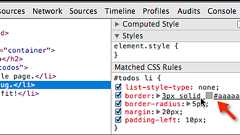
デフォルトのボックスモデルではwidth、heightの値にはpaddingとborderの値を含みませんが、box-sizingプロパティの値にborder-boxを指定すると、widthとheightの値はpaddingとborderの幅を含むようになります。 #box-sizing{ -moz-box-sizing: border-box; box-sizing: border-box; } 特にコンテンツの幅を指定するときや、Fluid Grid Systemを作成するときに計算が簡単になります。 例えば以下の図のような4カラムのGrid Systemで2カラム分の相対幅を求めるとします。 デフォルトの場合2カラム分の幅は60px×2+20px=140px、全体の幅は320pxとなるので、140÷320×100=43.75%となります。これにmarginやpaddingでガターの幅

CSS Resets BasicCSS resets are a staple found in many online resources. This snippet, which I’ve customized, is inspired by Eric Meyer’s reset codes.It includes responsive image settings and applies the border-box model to all core elements for consistent margin and padding measurements. /* Resetting Styles */html, body, div, span,applet, object, iframe, h1, h2, h3, h4, h5, h6, p,blockquote,
NewsLearn more about the company, PR and product updates here.

リリース、障害情報などのサービスのお知らせ
最新の人気エントリーの配信
処理を実行中です
j次のブックマーク
k前のブックマーク
lあとで読む
eコメント一覧を開く
oページを開く


