
サクサク読めて、
アプリ限定の機能も多数!
アプリで開く
Sourcemaps are the main piece in the jigsaw puzzle ofmapping symbols and locations from "built"JavaScript files back to the original source code. When you debug minifiedJavaScript in your browser's DevTools and see the original source with proper variable names and formatting, you're witnessing sourcemaps in action. For example, when your browser encounters anerror atbundle.min.js:1:27698,
About this Specification The document at https://tc39.es/ecma426/ is the most accurate and up-to-date sourcemap specification.It contains the content of the most recently published snapshot plus any modifications that will be included in the next snapshot. Contributing to this Specification This specification is developed onGitHub. There are a number of ways to contribute to the development of


Sourcemaps are a crucial tool in modern web development that make debugging significantly easier. This page explores the basics of sourcemaps, how they're generated, and how they improve the debugging experience. The need for sourcemapsEarly web apps were built with low complexity. Developers deployedHTML,CSS, andJavaScript files directly to the web. More modern and complex web apps can nee

This is a visualization ofJavaScript/CSS sourcemap data, which is useful for debugging problems with generated sourcemaps.It's designed to be high-performance soit doesn't fall over with huge sourcemaps. Drag and drop some files here or Upload files to get started. You can either drop a singleJavaScript/CSS file with an inline sourcemap comment, or aJavaScript/CSS file and a separate sour
Contributed by Benjamin Coe, who works onJavaScript client libraries atGoogle, is a collaborator on Node.js, and was the third engineer at npm, Inc. Photo by Soloman Soh from PexelsOf the 21,717 respondents to the 2019 State ofJavaScript Survey, ~60% said that they spend time working in an alternate flavor ofJavaScript, this is up from ~21% in 2016. Increasingly, when someone writesJavaScript

Notable Changes deps: upgrade to libuv 1.34.1 (cjihrig) #31332 upgrade npm to 6.13.6 (Ruy Adorno) #31304 module addAPI for interacting with sourcemaps (bcoe) #31132 loader getSource, getFormat, transform hooks (Geoffrey Booth) #30986logical conditional exports ordering (Guy Bedford) #31008 unflag conditional exports (Guy Bedford) #31001 process: allow monitoring uncaughtException (Gerhard Stoeb
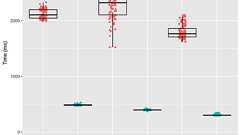
Edit: Further algorithmic improvements yielded additional speedups over what is described here, for total speedups of up to 10.9x faster than the original implementation. Read about these extra gains in Speed Without Wizardry! Tom Tromey and I have replaced the most performance-sensitive portions of the source-mapJavaScript Library’s sourcemap parser withRust code that is compiled to WebAssembl
「めんどくさそう」先入観で敬遠していたのですが、仕様を見たらそんなでもなかったので書き残しておきます。手っ取り早くコードを見たい方はこちらをどうぞ。 ユーザとして、ソースマップに接する機会は多いですが、AltJSを作るとかでもない限り、あまり提供側に回ることはないかもしれません。私自身、次のような疑問というか誤解を抱えたまま、深入りしなかったクチです...。 誤解1: ソースマップを作るにはASTを作る必要がある → 実際はもっとシンプル 誤解2: なんかすごいエンコード(AAAA;AACA;AACA;AACA...)がされてる → ただのBase64 よく見かけるソースマップの説明記事(というほど、記事自体ないけれど)では、「ソースを構文解析してASTを構築して...」という手順が出てくるのですが、 ソースマップにASTは必要ありません。 もちろん、実際にAltJSを作るならASTの作成

はじめにHTML の script タグ内にインラインで書かれた js をデバッグする方法を共有します本来であれば外部ファイルとして *.js にすべきですが、ワケあって <script> タグ内に js が書かれている場合に有効です! この方法は script タグに囲まれた js を、 あたかも外部ファイルの js として扱えるようになります やってみよう 例えば、以下のようなhtml があるとします。 <!DOCTYPEhtml> <html lang="ja"> <head> <meta charset="UTF-8"> <title>Qiita</title> </head> <body> <div id="hello">Hello World!</div> <script> document.querySelector('#hello').addEventListene

リリース、障害情報などのサービスのお知らせ
最新の人気エントリーの配信
処理を実行中です
j次のブックマーク
k前のブックマーク
lあとで読む
eコメント一覧を開く
oページを開く


