
Machine Learning with scikit-learn
Andreas Mueller
Overview
- Basic concepts of machine learning
- Introduction to scikit-learn
- Some useful algorithms
- Selecting a model
- Working with text data
scikit-learn
- Collection of machine learning algorithms and tools in Python.
- BSD Licensed, used in academia and industry (Spotify, bit.ly, Evernote).
- ~20 core developers.
- Take pride in good code and documentation.
- We want YOU to participate!
Two (three) kinds of learning
- Supervised
- Unsupervised
- Reinforcement
Supervised learning
Training: Examples X_train together with labels y_train.
Testing: Given X_test, predict y_test.
Examples
- Classification (spam, sentiment analysis, ...)
- Regression (stocks, sales, ...)
- Ranking (retrieval, search, ...)
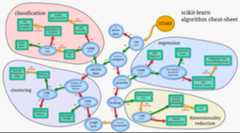
Unsupervised Learning
Examples X.Learn something about X.
Examples
- Dimensionality reduction
- Clustering
- Manifold learning
Data representation
Everything is anumpy array (or a scipy sparse matrix)!
Let's get some toy data.
fromsklearn.datasetsimportload_digitsdigits=load_digits()
print("images shape:%s"%str(digits.images.shape))print("targets shape:%s"%str(digits.target.shape))
images shape: (1797, 8, 8)targets shape: (1797,)
plt.matshow(digits.images[0],cmap=plt.cm.Greys);
digits.target
array([0, 1, 2, ..., 8, 9, 8])
Prepare the data
X=digits.data.reshape(-1,64)print(X.shape)
(1797, 64)
y=digits.targetprint(y.shape)
(1797,)
We have 1797 data points, each an 8x8 image -> 64 dimensional vector.
X.shape is always (n_samples, n_feature)
print(X)
[[ 0. 0. 0.3125 ..., 0. 0. 0. ] [ 0. 0. 0. ..., 0.625 0. 0. ] [ 0. 0. 0. ..., 1. 0.5625 0. ] ..., [ 0. 0. 0.0625 ..., 0.375 0. 0. ] [ 0. 0. 0.125 ..., 0.75 0. 0. ] [ 0. 0. 0.625 ..., 0.75 0.0625 0. ]]
Taking a Peek
Dimensionality Reduction and Manifold Learning
- Always first have a look at your data!
- Projecting to two dimensions is the easiest way.
Principal Component Analysis (PCA)
fromsklearn.decompositionimportPCA
Instantiate the model. Set parameters.
pca=PCA(n_components=2)
Fit the model.
pca.fit(X);
Apply the model. For embeddings / decompositions, this istransform.
X_pca=pca.transform(X)X_pca.shape
(1797, 2)
plt.figsize(16,10)plt.scatter(X_pca[:,0],X_pca[:,1],c=y);
print(pca.mean_.shape)print(pca.components_.shape)
(64,)(2, 64)
fix,ax=plt.subplots(1,3)ax[0].matshow(pca.mean_.reshape(8,8),cmap=plt.cm.Greys)ax[1].matshow(pca.components_[0,:].reshape(8,8),cmap=plt.cm.Greys)ax[2].matshow(pca.components_[1,:].reshape(8,8),cmap=plt.cm.Greys);
Isomap
fromsklearn.manifoldimportIsomap
Instantiate the model. Set parameters.
isomap=Isomap(n_components=2,n_neighbors=20)
Fit the model.
isomap.fit(X);
Apply the model.
X_isomap=isomap.transform(X)X_isomap.shape
(1797, 2)
plt.scatter(X_isomap[:,0],X_isomap[:,1],c=y);
Classification
To evaluate the algorithm, split data into training and testing part.
fromsklearn.cross_validationimporttrain_test_splitX_train,X_test,y_train,y_test=train_test_split(X,y,random_state=0)
print("X_train shape:%s"%repr(X_train.shape))print("y_train shape:%s"%repr(y_train.shape))print("X_test shape:%s"%repr(X_test.shape))print("y_test shape:%s"%repr(y_test.shape))
X_train shape: (1347, 64)y_train shape: (1347,)X_test shape: (450, 64)y_test shape: (450,)
Start Simple: Linear SVMs
fromsklearn.svmimportLinearSVC
Finds a linear separation between the classes.
Instantiate the model.
svm=LinearSVC()
Fit the model using the known labels.
svm.fit(X_train,y_train);
Apply the model. For supervised algorithms, this ispredict.
svm.predict(X_train)
array([2, 8, 9, ..., 7, 7, 8])
Evaluate the model.
svm.score(X_train,y_train)
0.99257609502598365
svm.score(X_test,y_test)
0.96444444444444444
More complex: Random Forests
fromsklearn.ensembleimportRandomForestClassifier
Builds many randomized decision trees and averages their results.
Instantiate the model.
rf=RandomForestClassifier()
Fit the model.
rf.fit(X_train,y_train);
Evaluate.
rf.score(X_train,y_train)
0.99925760950259834
rf.score(X_test,y_test)
0.95111111111111113
Model Selection and Evaluation
Always keep a separate test set to the end.
- Measure performance using cross-validation
fromsklearn.cross_validationimportcross_val_scorescores=cross_val_score(rf,X_train,y_train,cv=5)print("scores:%s mean:%f std:%f"%(str(scores),np.mean(scores),np.std(scores)))
scores: [ 0.95185185 0.94074074 0.93680297 0.95910781 0.92936803] mean: 0.943574 std: 0.010635
Maybe more trees will help?
rf2=RandomForestClassifier(n_estimators=50)scores=cross_val_score(rf2,X_train,y_train,cv=5)print("scores:%s mean:%f std:%f"%(str(scores),np.mean(scores),np.std(scores)))
scores: [ 0.95555556 0.97407407 0.97026022 0.97769517 0.96282528] mean: 0.968082 std: 0.007970
Adjust important parameters using grid search
fromsklearn.grid_searchimportGridSearchCV
- Let's look at LinearSVC again.
- Only important parameter: C
param_grid={'C':10.**np.arange(-3,4)}grid_search=GridSearchCV(svm,param_grid=param_grid,cv=3,verbose=3,compute_training_score=True)
grid_search.fit(X_train,y_train);
[GridSearchCV] C=0.001 .........................................................[GridSearchCV] ................................ C=0.001, score=0.902004 - 0.1s[GridSearchCV] C=0.001 .........................................................[GridSearchCV] ................................ C=0.001, score=0.895323 - 0.1s[GridSearchCV] C=0.001 .........................................................[GridSearchCV] ................................ C=0.001, score=0.879733 - 0.1s[GridSearchCV] C=0.01 ..........................................................[GridSearchCV] ................................. C=0.01, score=0.953229 - 0.1s[GridSearchCV] C=0.01 ..........................................................[GridSearchCV] ................................. C=0.01, score=0.937639 - 0.1s[GridSearchCV] C=0.01 ..........................................................[GridSearchCV] ................................. C=0.01, score=0.919822 - 0.1s[GridSearchCV] C=0.1 ...........................................................[GridSearchCV] .................................. C=0.1, score=0.973274 - 0.1s[GridSearchCV] C=0.1 ...........................................................[GridSearchCV] .................................. C=0.1, score=0.951002 - 0.1s[GridSearchCV] C=0.1 ...........................................................[GridSearchCV] .................................. C=0.1, score=0.951002 - 0.1s[GridSearchCV] C=1.0 ...........................................................[GridSearchCV] .................................. C=1.0, score=0.977728 - 0.2s[GridSearchCV] C=1.0 ...........................................................[GridSearchCV] .................................. C=1.0, score=0.957684 - 0.2s[GridSearchCV] C=1.0 ...........................................................[GridSearchCV] .................................. C=1.0, score=0.964365 - 0.2s[GridSearchCV] C=10.0 ..........................................................[GridSearchCV] ................................. C=10.0, score=0.975501 - 0.2s[GridSearchCV] C=10.0 ..........................................................[GridSearchCV] ................................. C=10.0, score=0.944321 - 0.2s[GridSearchCV] C=10.0 ..........................................................[GridSearchCV] ................................. C=10.0, score=0.962138 - 0.2s[GridSearchCV] C=100.0 .........................................................[GridSearchCV] ................................ C=100.0, score=0.962138 - 0.2s[GridSearchCV] C=100.0 .........................................................[GridSearchCV] ................................ C=100.0, score=0.935412 - 0.2s[GridSearchCV] C=100.0 .........................................................[GridSearchCV] ................................ C=100.0, score=0.957684 - 0.2s[GridSearchCV] C=1000.0 ........................................................[GridSearchCV] ............................... C=1000.0, score=0.964365 - 0.2s[GridSearchCV] C=1000.0 ........................................................[GridSearchCV] ............................... C=1000.0, score=0.935412 - 0.2s[GridSearchCV] C=1000.0 ........................................................[GridSearchCV] ............................... C=1000.0, score=0.957684 - 0.2s
[Parallel(n_jobs=1)]: Done 1 jobs | elapsed: 0.1s[Parallel(n_jobs=1)]: Done 21 out of 21 | elapsed: 3.2s finished
print(grid_search.best_params_)print(grid_search.best_score_)
{'C': 1.0}0.966592427617plt.figsize(12,6)plt.plot([c.mean_validation_scoreforcingrid_search.cv_scores_],label="validation error")plt.plot([c.mean_training_scoreforcingrid_search.cv_scores_],label="training error")plt.xticks(np.arange(6),param_grid['C']);plt.xlabel("C");plt.ylabel("Accuracy");plt.legend(loc='best');
Overfitting and Complexity Control
to the right: overfitting aka high variance.
- Means no generalization.
to the left: underfitting aka high bias.
- Means bad even on training set.
plt.plot([c.mean_validation_scoreforcingrid_search.cv_scores_],label="validation error")plt.plot([c.mean_training_scoreforcingrid_search.cv_scores_],label="training error")plt.xticks(np.arange(6),param_grid['C']);plt.xlabel("C");plt.ylabel("Accuracy");plt.legend(loc='best');
Detecting Insults in Social Commentary
- My first (and only) kaggle entry.
- Classify short forum posts as insulting or not.
- A simple bag of word model carries quite far.
- Linear classifiers are usually the best for text data.
Read the CSV using Pandas (a bit overkill).
importpandasaspdtrain_data=pd.read_csv("kaggle_insult/train.csv")test_data=pd.read_csv("kaggle_insult/test_with_solutions.csv")
- The column "Insult" contains the target.
- The column "Comment" contains the text.
y_train=np.array(train_data.Insult)comments_train=np.array(train_data.Comment)print(comments_train.shape)print(y_train.shape)
(3947,)(3947,)
print(comments_train[0])print("Insult:%d"%y_train[0])
"You fuck your dad."Insult: 1
print(comments_train[5])print("Insult:%d"%y_train[5])
"@SDL OK, but I would hope they'd sign him to a one-year contract to start with. Give him the chance to be reliable and productive, but give themselves the out if all his time off has hurt his playing skills or if he falls back into old habits."Insult: 0
Vectorizing the Data
fromsklearn.feature_extraction.textimportCountVectorizer
- Use bag of words model as implemented in CountVectorizer.
- Extracts a dictionary, then counts word occurences.
cv=CountVectorizer()cv.fit(comments_train)print(cv.get_feature_names()[:15])
[u'00', u'000', u'01', u'014', u'01k4wu4w', u'02', u'034', u'05', u'06', u'0612', u'07', u'075', u'08', u'09', u'0bama']
print(cv.get_feature_names()[1000:1015])
[u'argue', u'argued', u'arguement', u'arguements', u'arguing', u'argument', u'arguments', u'aries', u'aristocracy', u'aritculett', u'arizona', u'arkan', u'arlington', u'arm', u'armando']
X_train=cv.transform(comments_train).tocsr()print("X_train.shape:%s"%str(X_train.shape))print(X_train[0,:])
X_train.shape: (3947, 16469) (0, 3409)1 (0, 5434)1 (0, 16397)1 (0, 16405)1
Training a Classifier
- LinearSVC : linear SVM that is efficient for sparse data.
fromsklearn.svmimportLinearSVCsvm=LinearSVC()svm.fit(X_train,y_train)
LinearSVC(C=1.0, class_weight=None, dual=True, fit_intercept=True, intercept_scaling=1, loss='l2', multi_class='ovr', penalty='l2', random_state=None, tol=0.0001, verbose=0)
comments_test=np.array(test_data.Comment)y_test=np.array(test_data.Insult)X_test=cv.transform(comments_test)svm.score(X_test,y_test)
0.83037400831129582
print(comments_test[8])print("Target:%d, prediction:%d"%(y_test[8],svm.predict(X_test.tocsr()[8])[0]))
"To engage in an intelligent debate with you is like debating to a retarded person. It's useless. It looks like you're bent on disregarding the efforts of the government."Target: 1, prediction: 1
Next Steps
- Grid search
Cparameter of LinearSVC.
- Build a pipeline, adjust parameters of feature extraction.
- Combine different feature extraction methods.
Take Away
- Get your data into an array
(n_samples, n_features).
- model.fit(X), model.predict(X) / model.transform(X)
- Always do cross-validation. Leave the test set until the end.
- Internalize the complexity / generalization tradeoff.
Fin
 | amueller@ais.uni-bonn.de |
 | @t3kcit |
 | @amueller |
 | peekaboo-vision.blogspot.com |